
Root cause analysis when your stack lives on someone else's servers
When your dashboards light up, the first question is "is it us?" Pingoru watches the official status page of every cloud and SaaS service your product depends on, so you can rule a vendor in or out in the time it takes to open a tab.
How an investigation runs with Pingoru
A modern product talks to dozens of services it does not own. When one of them blips, your dashboards light up exactly as they do for a bug in your own code. The hard part is finding which door the problem came through.
A customer reports a problem at 14:23 UTC
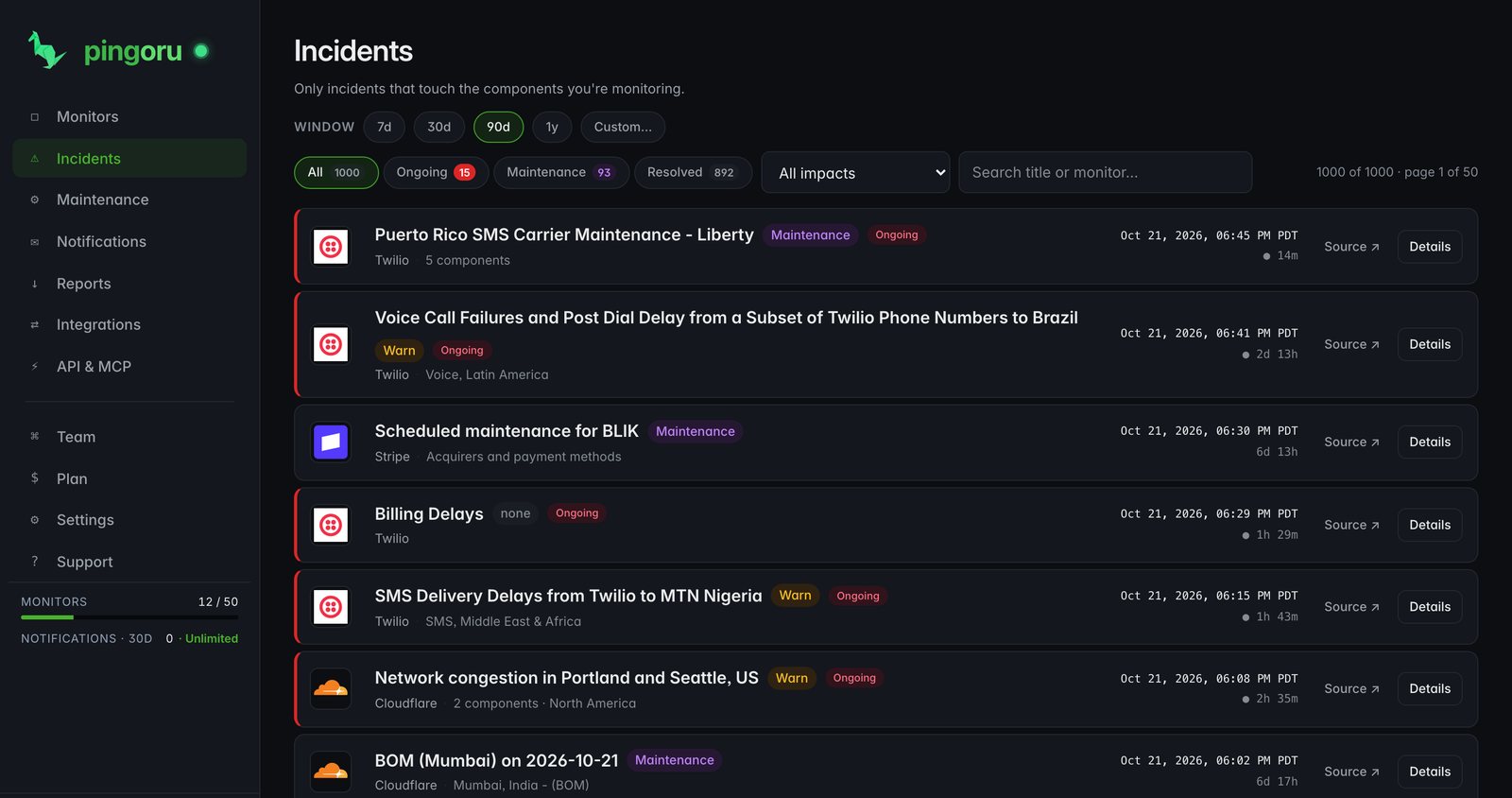
Open your incident feed and look for vendor activity around that time. Every vendor you watch is there, with open incidents at the top.
Spot the upstream cause
AWS has a major incident in us-east-1 that started at 14:18, five minutes before your customer noticed. The row names the service, not just "AWS", with severity and duration.
Read the vendor timeline
Open the incident for every update the vendor posted, with exact times: investigating, identified, monitoring, resolved. No need to load the vendor's page.
Export for the postmortem
Pull the days around the incident as CSV or JSON with start, end, duration, components and every update. Paste it into the postmortem doc.
Look for patterns
Lay a quarter of vendor incidents over your own alert log. The same vendor three times is a renewal conversation; a recurring maintenance window at your peak hour is an architecture one.
Every status change, every update, every timestamp
Outages rarely go from up to down in one step. Pingoru keeps each stage the vendor posts with its exact time and text, so the record reads "investigating at 14:18, identified at 14:24, resolved at 14:56" rather than "down for 38 minutes".
The stages a vendor walks through
Investigating
The vendor has noticed something; the cause is unknown.
Identified
They know what is broken and are working on it.
Monitoring
A fix is out and they are watching recovery.
Resolved
Confirmed back to normal.
The gap between investigating and identified tells you when the vendor knew what was wrong, which matters for your write-up and for any SLA credit later.
Built for the first ten minutes
One screen instead of twenty tabs
Every vendor you watch, with its current state and any open incident, in one feed.
Down to the service
Not "AWS is up" but "EC2 in us-east-1 is degraded and everything else is fine". That is the detail an investigation needs.
Cascades side by side
When several major vendors break within the same half hour, the incident page lists them together, so a failure that started in one cloud region is easy to see.
Every vendor's history in one place
Every incident we have seen for each vendor you watch, in one feed, with a full year of it on Pro.
Alerts in the incident channel
Send vendor incidents to Slack, Discord, Teams, PagerDuty or a signed webhook. The first message in the war room becomes "AWS just opened an incident" instead of "anyone else seeing this?"
Exports with the whole story
CSV and JSON include each update with its time and text, the components affected and the vendor's status page address.
Who runs investigations with Pingoru
SRE and platform engineers
The fastest answer to "is it us or them?" before an hour goes into debugging your own code.
Engineering managers
Postmortem prep without chasing vendor screenshots a week later.
Support teams
Confirm a vendor is down before replying "we're investigating" to twenty tickets.
On-call
At 3am, the first 30 seconds decide between going back to sleep and a four-hour session.
Vendors we already watch
 Amazon Web Services
Free for 3 vendors. Pro is $5 a month for 50.
Pro adds a year of incident history for postmortems, 10 team seats and unlimited notifications. No card to start.
Questions
What is root cause analysis?
Working out why something broke, not just what is failing. For products built on dozens of outside services, the answer is usually a bug in your code, a problem in your infrastructure, or a vendor having an incident. Pingoru exists to confirm or rule out the third one fast.
How is Pingoru different from APM tools?
APM tells you what broke: latency spiked, errors climbed, an endpoint started returning 500s. It cannot tell you why when the answer is "us-east-1 is having a bad day". Pingoru shows every vendor's official status next to that, so you can check the time of your alert against open vendor incidents. Most teams use both.
How fast can I confirm a vendor outage?
As fast as you can open one tab. The dashboard shows every vendor you added with its current state. If one is red, you have your answer. If all are green, the problem is on your side and you can focus on debugging.
Do you keep the full incident timeline or just the headline?
The full timeline. Every update the vendor posts is stored with its time and text, including maintenance states, so a postmortem can cite when the vendor first knew, when it found the cause and when it was over.
Can I export incident data for postmortems or SLA reports?
Yes. Export any date range as CSV or JSON, with every update, the affected components and the provider's status page address. Free covers the last 30 days; Pro covers the full year.
Does it cover the vendors my stack depends on?
8,000+ providers, including every AWS region and service, every Google Cloud product, every Azure service, Stripe, GitHub, OpenAI, Anthropic, Cloudflare, Slack, Twilio, Salesforce, Microsoft 365, Google Workspace and the long tail. Anything missing can be requested from the dashboard.
Is there a free plan for small teams?
Yes. 3 monitors, email, Slack and webhook alerts, 30 days of history, and the public provider pages for anyone on your team. Pro ($5 a month) adds 50 monitors, a year of history, 10 seats and unlimited notifications.