
When a vendor breaks their SLA, have the receipts
Incident records for every cloud and SaaS vendor in your stack, kept as each update is posted. When an outage hits, you have the four facts every service-credit claim asks for: when it started, when it ended, what was affected and how long it lasted.
Vendor SLAs are easy to write and hard to enforce
The vendor controls its page
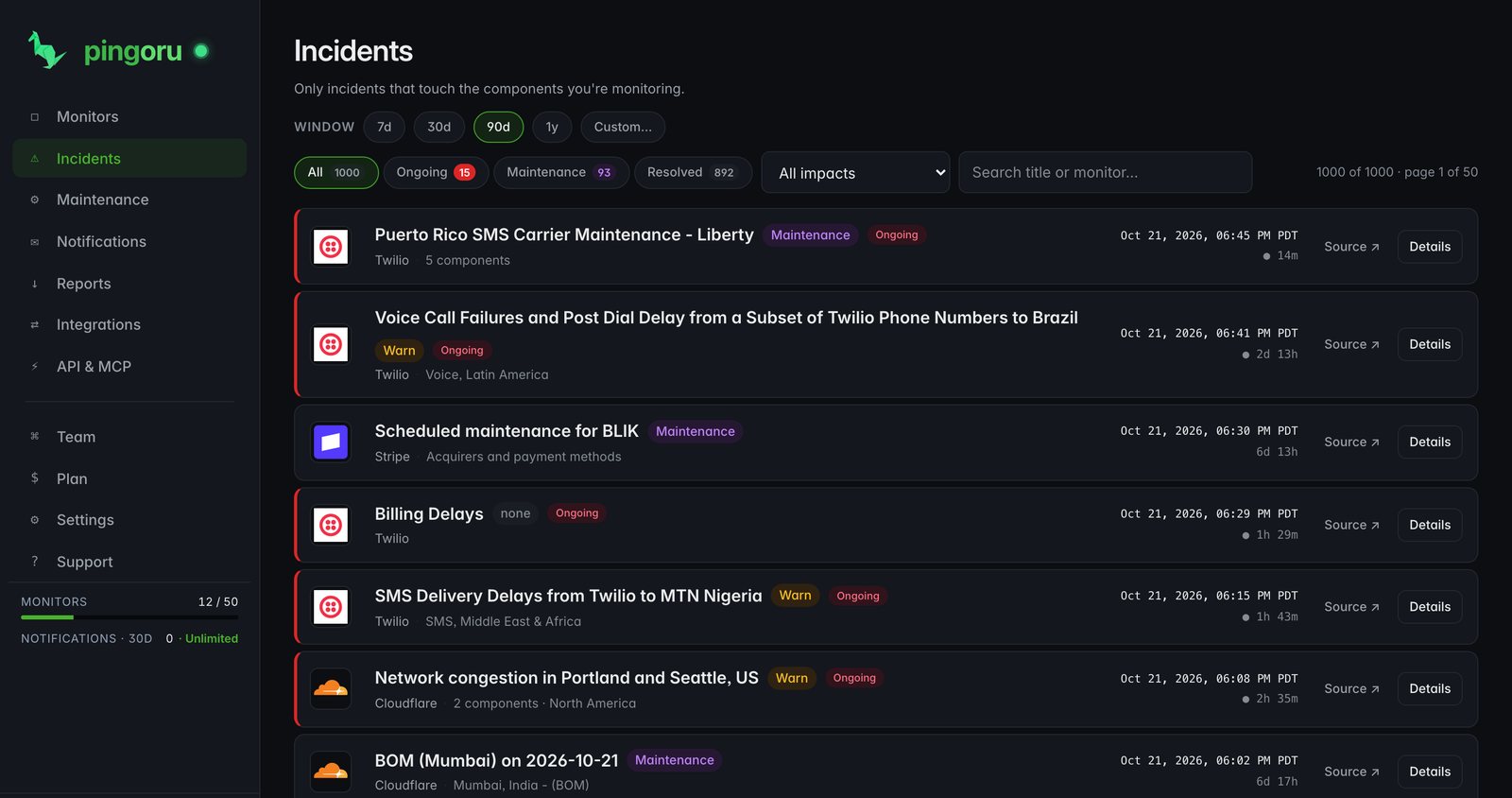
Vendors can edit or take down incidents after the fact. Pingoru keeps every update as it was posted, records later edits as new timeline entries, and keeps incidents a vendor removes.
Credit claims have deadlines
Many SLAs set a deadline for credit claims. Without your own record, last quarter's outages fall off the table.
Several vendors, no shared view
When AWS, Stripe and your CDN all had a bad week, which one cost you most? Without per-vendor history you cannot make the case to any of them.
Every incident, captured the moment it is posted
Pingoru reads every status page every five to ten minutes. When a vendor opens an incident we record the start time, components, severity and each update as it is posted. Later edits become new timeline entries instead of replacing what was there, and the record stays in your account.
What the record is good for
Vendor marketing says 99.99%. The record says it depends on the region and the quarter. Because it is built from the incidents the vendor posted itself, the numbers hold up in a conversation with that vendor.
Renewal negotiations
Bring twelve months of incidents per vendor, not impressions. Real downtime moves the talk from list price to what was delivered.
Postmortems
Line a customer-facing outage up against the vendor's own timeline, minute by minute.
Service credits
Work out what you are owed from the vendor's own admission: start, end, duration and the components affected.
Region and vendor choices
Decide where to deploy from months of regional incident history rather than marketing pages.
Cloud uptime monitoring you can cite
A 90-day bar on every provider page
Each of the 8,000+ providers has a public page with a 90-day bar and its outage history. Share the link in a vendor review or an evaluation doc.
Down to the component
Each incident keeps the components the vendor named, such as EC2 us-east-1 or Stripe Checkout, so "EC2 had a bad month" is a claim you can back.
The same method for every vendor
Every record is built the same way, from the incidents the vendor posted on its own page, so comparing vendors is fair.
CSV and JSON exports
Export the incidents for your monitors with every update, ready for a spreadsheet, a renewal deck or an SLA calculation.
How it works
Add the vendors in your stack
Pick from 8,000+ providers, and narrow to components such as EC2 us-east-1 or Stripe Checkout.
Pingoru reads every status page every five to ten minutes
The official status page is the source. Each incident is captured as it is posted, with its updates and components.
Hear about the breach when it starts
Email, Slack, Discord, Teams or webhook. Knowing within minutes, not hours later from a customer, is worth the price on its own.
Pull the record when you need it
Each incident has a permanent page with start, end, duration and components. Paste it into a credit form, a support ticket or a quarterly review.
Who uses SLA monitoring
Procurement and vendor management
Show up to renewals with a year of incident data per vendor.
Engineering leadership
Your SLOs rest on the vendor SLAs underneath them. Track upstream breaches so a 99.9% goal is not undone by a 99.5% dependency.
Customer success and support
When an escalation traces back to a vendor, the timeline is already in hand, with every update the vendor posted.
FinOps and compliance
Service credits add up across a stack of vendors. Treat every breach as a line item you can recover.
A year of evidence on Pro, $5 a month.
Free covers 3 vendors and 30 days of history. Pro covers 50 vendors, 12 months of history and 10 team seats. No card to start.
Questions
What is SLA monitoring?
Tracking whether your cloud and SaaS vendors keep the uptime promises in their contracts. Pingoru records every incident from the official status page as it is posted, with its start, duration, components and severity, and keeps each update as it was written, so the story survives later edits.
How does Pingoru help me claim service credits?
Most vendor SLAs include service credits, but you have to prove the breach. Every incident is captured from the official status page within minutes and kept for 12 months on Pro. When an outage happens you have the start time, resolved time, total duration and affected components as the vendor reported them, plus each update it posted: the facts a credit form asks for.
Can I track SLAs across several vendors at once?
Yes. Add a monitor for every vendor in your stack. Each keeps its own incident history, so you can see which vendors are repeat offenders and which ones deliver.
How is the 90-day bar worked out?
From the vendor's own incidents. Each day is coloured by the share of the vendor's components its incidents affected that day, weighted by impact. One affected component out of thousands still reads green, while a broad outage reads red. For a single component, the bar on the component list counts only incidents that name it.
How fast does a breach reach me?
Pingoru reads every status page every five to ten minutes, so an incident usually reaches you within minutes of the vendor posting it. The timeline fills in as the vendor adds updates, so the record is complete when the incident resolves.
How much history do I get?
30 days on Free and 12 months on Pro ($5 a month). Most enterprise SLAs are measured quarterly or yearly, so a year on hand covers the window with time left to file.
Can I export incident records?
Yes. Every incident page is permanent and shareable, and the dashboard exports your incidents as CSV or JSON with start, end, duration, components, severity and the full update timeline.
Does this replace monitoring my own endpoints?
No. Uptime checks watch your endpoints; Pingoru watches the vendors behind them. Together they show when a failure of yours started upstream.
Is there a free plan?
Yes. Free covers 3 monitors, 30 days of history, and email, Slack and webhook alerts. Pro ($5 a month) raises that to 50 monitors, 12 months of history and every integration.